
Since Google officially made Core Web Vitals a ranking factor in 2021, every website owner needs to understand them — not just developers. If your website fails these performance benchmarks, Google is actively ranking your competitors above you, regardless of how good your content is. And if you are paying for SEO website services without your provider mentioning Core Web Vitals, you are not getting complete SEO support.
This guide explains exactly what Core Web Vitals are, what LCP, FID, and CLS mean in plain language, how they impact your Google rankings, and — most importantly — how to fix them. No technical background required.
What Are Core Web Vitals?
Core Web Vitals are a set of specific website performance measurements that Google uses to evaluate the real-world user experience of your web pages. They measure how fast your page loads, how quickly it responds to user interaction, and how stable it is visually as it loads.
Google introduced Core Web Vitals as an extension of its long-standing commitment to rewarding fast, user-friendly websites. The difference is that Core Web Vitals are measurable, standardised, and publicly tested — meaning you can see exactly where your website stands and what needs to be fixed.
Any complete SEO website services package in 2025 must include Core Web Vitals monitoring and improvement. It is no longer optional.
The Three Core Web Vitals: LCP, FID, and CLS Explained
LCP — Largest Contentful Paint
What it measures: How long it takes for the largest visible element on your page to fully load. This is usually your hero image, a large heading, or a video thumbnail — whatever is the biggest piece of content visible in the browser window when the page first loads.
In plain language: How long does a visitor wait before they see the main content of your page? A fast LCP means they see something useful almost immediately. A slow LCP means they stare at a blank or partially loaded screen, which leads to frustration and page abandonment.
| LCP Score | Rating | Google’s Assessment |
|---|---|---|
| ≤ 2.5 seconds | Good ✅ | Positive ranking signal |
| 2.5 – 4.0 seconds | Needs Improvement ⚠️ | Neutral — opportunity to improve |
| > 4.0 seconds | Poor ❌ | Negative ranking signal |
Common causes of poor LCP:
- Large, uncompressed hero images (the most common cause on Indian websites)
- Slow server response time (cheap shared hosting)
- Render-blocking JavaScript and CSS that delays content from appearing
- No CDN — serving images from a server far from the user
How to fix LCP:
- Compress and convert your hero image to WebP format — this alone fixes LCP on most WordPress sites
- Add
fetchpriority="high"attribute to your LCP image so the browser prioritises loading it - Upgrade to a faster hosting plan or switch to a server with India/Singapore location
- Enable a caching plugin (WP Rocket or LiteSpeed Cache for WordPress)
- Use a CDN like Cloudflare to serve static assets from locations close to your users
FID — First Input Delay (Now INP: Interaction to Next Paint)
What it measures: How quickly your page responds when a user first interacts with it — clicking a button, tapping a link, or typing in a form field. Google updated this metric to INP (Interaction to Next Paint) in 2024, which measures responsiveness throughout the entire visit, not just the first interaction.
In plain language: When a visitor clicks your “Contact Us” button, does it respond instantly or is there a noticeable lag? A high FID/INP makes your website feel sluggish and unresponsive — damaging user trust and increasing abandonment.
| INP Score | Rating | User Experience |
|---|---|---|
| ≤ 200ms | Good ✅ | Feels instant to users |
| 200 – 500ms | Needs Improvement ⚠️ | Noticeable but tolerable |
| > 500ms | Poor ❌ | Feels broken or unresponsive |
How to fix FID/INP:
- Break long JavaScript tasks into smaller chunks using code splitting
- Defer or remove non-essential third-party scripts (chat widgets, analytics, social plugins)
- Use a web worker to offload heavy JavaScript from the main browser thread
- Audit and reduce the number of JavaScript plugins — WordPress sites with 30+ plugins often have severe FID issues
CLS — Cumulative Layout Shift
What it measures: How much your page content visually shifts (jumps around) as it loads. Every unexpected shift — an image loading and pushing text down, an ad suddenly appearing and moving a button — contributes to your CLS score.
In plain language: Have you ever been about to click a button on a website and the page suddenly jumped, causing you to click something completely different? That is CLS — and it is extremely frustrating. Google penalises pages that cause this experience.
| CLS Score | Rating | User Experience |
|---|---|---|
| ≤ 0.1 | Good ✅ | Page loads smoothly and stably |
| 0.1 – 0.25 | Needs Improvement ⚠️ | Some shifting noticeable |
| > 0.25 | Poor ❌ | Major layout instability |
How to fix CLS:
- Set explicit width and height attributes on every image and video — this reserves space in the layout before they load
- Avoid inserting content above existing content after it has loaded
- Use CSS aspect-ratio boxes for embedded videos and iframes
- Preload web fonts and set a font-display property to avoid invisible text and font swaps that cause layout shift
- Avoid ads and embeds that do not reserve space before loading
How to Audit and Fix Your Core Web Vitals: Step by Step
- Test Current Score: Run your website URL through Google PageSpeed Insights (pagespeed.web.dev) — it shows your real-world Core Web Vitals data and lab data separately
- Identify Failing Vitals: Check which of LCP, INP, and CLS are showing “Needs Improvement” or “Poor” in both mobile and desktop results
- Find Root Cause: PageSpeed Insights shows specific “Opportunities” and “Diagnostics” that identify exactly what is causing each issue — large images, render-blocking resources, missing size attributes, etc.
- Implement Fixes: Address the highest-impact issues first — image compression alone typically improves LCP by 40 to 60% on most Indian business websites
- Retest & Monitor: Re-run PageSpeed Insights after each fix and monitor your Core Web Vitals report in Google Search Console regularly
How Core Web Vitals Affect SEO Website Services Performance
Google confirmed in 2021 that Core Web Vitals are a ranking signal through its Page Experience update. Here is the practical impact:
- Pages meeting all three “Good” thresholds get a Page Experience signal advantage in rankings
- In highly competitive niches where multiple pages have similar content quality, Core Web Vitals can be the deciding factor in which page ranks higher
- For mobile search specifically (where over 70% of Indian users search), failing mobile Core Web Vitals has a more significant negative impact than failing desktop
- Google Search Console’s Core Web Vitals report shows you which specific pages are failing — prioritise fixing high-traffic pages first
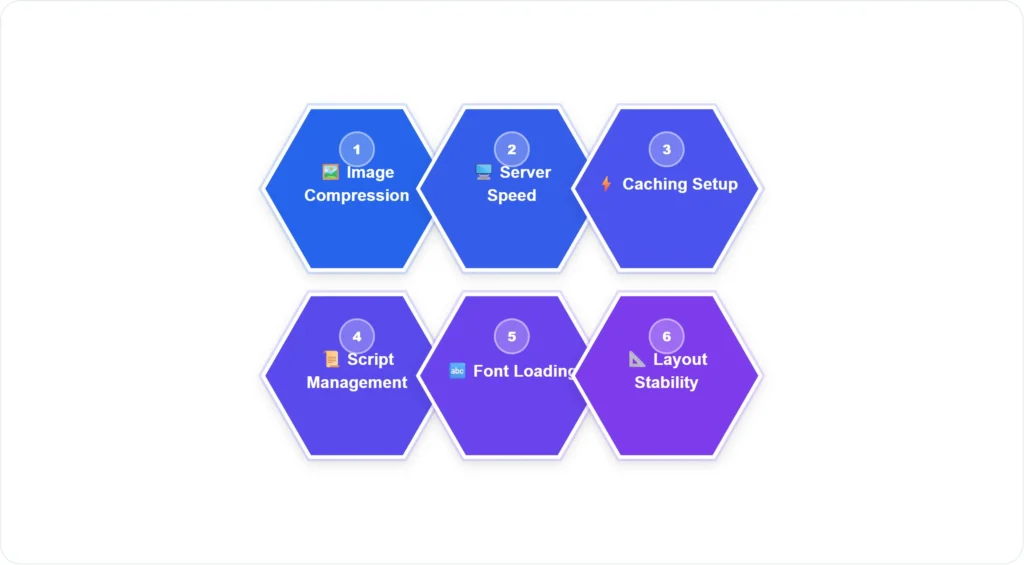
The 6 Key Fix Areas That Improve All Core Web Vitals
- 🖼️ Image Compression: Convert to WebP, compress below 100KB, set explicit dimensions — fixes LCP and CLS simultaneously
- 🖥️ Server Speed: Upgrade hosting to a faster plan with India/Singapore location — improves LCP and TTFB directly
- ⚡ Caching Setup: Enable browser caching and server-side caching — reduces load time for returning visitors and improves LCP
- 📜 Script Management: Defer non-critical JavaScript, remove unused plugins — improves FID/INP and LCP
- 🔤 Font Loading: Preload fonts, use font-display: swap — eliminates invisible text and the CLS caused by font swaps
- 📐 Layout Stability: Set width/height on all media, avoid late-loading ads above content — directly fixes CLS score
If you need help implementing these fixes or want a professional audit of your website’s Core Web Vitals, contact ByteMinders. Our SEO website services include full Core Web Vitals optimisation as a standard component of every website project.
For the broader technical context, read our complete SEO-friendly website development checklist — which covers all technical SEO requirements from pre-build planning to post-launch monitoring.
Tools for Measuring Core Web Vitals
| Tool | What It Shows | Best For |
|---|---|---|
| Google PageSpeed Insights | Real-world + lab data for LCP, INP, CLS with specific fix recommendations | First audit, ongoing testing |
| Google Search Console | Aggregated real-user Core Web Vitals data across all your pages | Monitoring which pages are failing at scale |
| GTmetrix | Detailed waterfall chart, video playback of page load, historical tracking | Deep-dive diagnostics |
| Chrome DevTools | Real-time performance profiling, LCP element identification | Developer-level debugging |
| Web Vitals Chrome Extension | Live Core Web Vitals overlay while browsing any website | Quick competitive checks |
Frequently Asked Questions
Q1. How much do Core Web Vitals actually impact my Google rankings?
Google has described Core Web Vitals as a tiebreaker rather than a dominant ranking factor — meaning highly relevant, quality content will still outrank a perfectly optimised page with poor content. However, in competitive niches where several pages have similar content quality, Core Web Vitals are increasingly the deciding factor. More practically, pages with poor CWV have higher bounce rates because they frustrate users, which indirectly damages rankings through poor engagement signals.
Q2. My website scores well on desktop but poorly on mobile. Does this matter?
Yes — significantly. Google uses mobile-first indexing, meaning it primarily uses your mobile page experience to determine your ranking. A good desktop score with a poor mobile score will hurt your rankings because Google’s evaluation is weighted toward mobile. In India specifically, where over 70% of web traffic is mobile, failing mobile Core Web Vitals is a serious SEO and user experience problem.
Q3. Will improving Core Web Vitals alone significantly increase my Google traffic?
Improving Core Web Vitals is necessary but not sufficient on its own. It removes a ranking disadvantage and ensures your user experience does not actively drive people away — but you also need strong content, proper keyword targeting, and backlinks to increase organic traffic meaningfully. Think of Core Web Vitals as the floor you must meet; content and authority are what determine how high above that floor you rank.
Q4. How often should I check my Core Web Vitals?
Monthly at minimum — and after every significant update to your website. Adding new plugins, changing your theme, uploading large images, or adding third-party embeds can all degrade your Core Web Vitals without you realising it. Set up the Google Search Console Core Web Vitals report and check it as part of your monthly website maintenance routine.
Q5. Can a WordPress plugin fix all my Core Web Vitals issues?
Plugins like WP Rocket, LiteSpeed Cache, or Imagify address many common CWV issues — caching, image compression, lazy loading, and script deferral. They can dramatically improve LCP and sometimes CLS. However, they cannot fix fundamental issues caused by poor theme code, oversized images that were never compressed, or server-level performance problems. A plugin is a tool — it works best when the underlying website is built sensibly.