
This is not a marketing checklist. It’s a Developer Guide to building search-friendly systems from the ground up. Every element that helps or hurts SEO lives inside your HTML, your JavaScript, your server config, and your build pipeline. Treating SEO as a post-launch “add-on” means leaving rankings, traffic, and visibility to chance. Developers who understand SEO don’t just write cleaner code — they build sites that actually reach their audience.
This guide is written for developers who want to build websites that rank, and for business owners who want to understand why their developer’s technical choices matter so deeply for their marketing results. It covers every on-page SEO element you need to implement correctly, with practical code-level guidance throughout.
What is On-Page SEO and How Does it Connect to Web Development and SEO?
On-page SEO refers to all the optimisations made directly on your web pages — as opposed to off-page SEO (backlinks) or technical SEO (server and crawl configuration). It is the intersection where web development and SEO overlap most directly, because most on-page factors are implemented in HTML, CSS, or your CMS configuration.
On-page SEO includes:
- Title tags, meta descriptions, and heading structure
- URL structure and slug optimisation
- Content quality, keyword usage, and readability
- Image alt text and file naming
- Internal linking and anchor text
- Page speed and Core Web Vitals
- Structured data (schema markup)
- Mobile responsiveness and user experience signals
Get all of these right from the start and your content has every technical advantage Google can measure. Miss them — even with excellent content — and you are fighting with one hand tied behind your back.
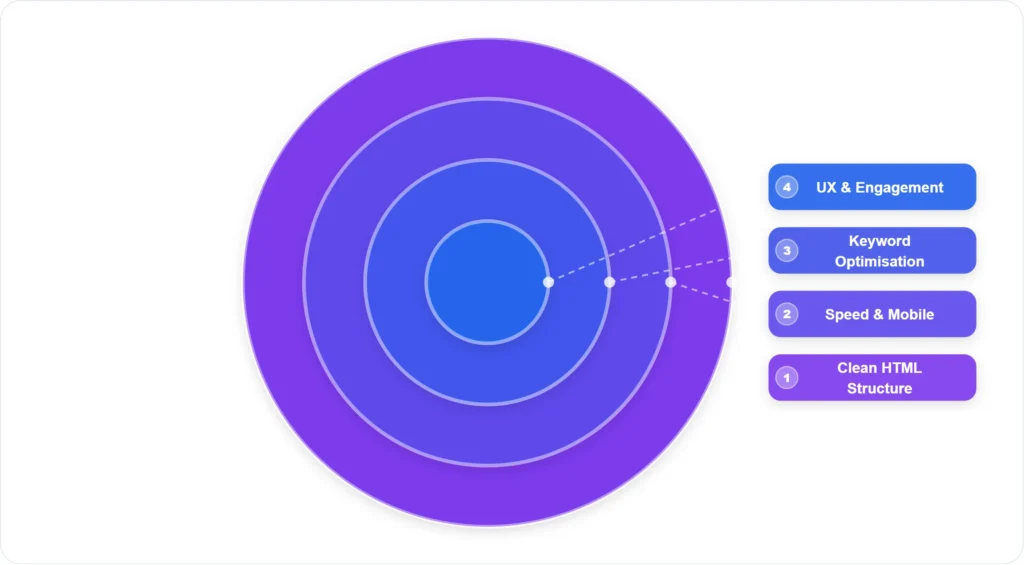
The On-Page SEO Layers Every Developer Must Understand
- 🔵 UX & Engagement: Bounce rate, time on page, internal linking, clear CTAs — signals that tell Google users find your content valuable
- 🟢 Keyword Optimisation: Focus keyword in H1, H2s, first 100 words, meta title, meta description, and naturally throughout content
- 🟡 Speed & Mobile: Core Web Vitals, responsive design, image compression, caching — the performance layer Google directly measures
- 🔴 Clean HTML Structure: Semantic HTML, proper heading hierarchy, valid markup, no render-blocking code — the foundation everything else rests on
1. Title Tags: Your Most Important On-Page SEO Element
The title tag appears in Google search results as the blue clickable headline. It is the single strongest signal you give Google about what a page is about — and it is one of the first things users see when deciding whether to click.
Best practices for web development and SEO title tags:
- Keep it under 60 characters — Google truncates longer titles in search results
- Place the focus keyword as close to the beginning as possible
- Make it compelling to click — it should read like a promise of value, not just a label
- Every page on the site must have a unique title tag — no duplicates
- For RankMath users: the SEO title field in the RankMath panel overrides the WordPress page title in Google — fill it separately
Example:
❌ Weak: “Services | ByteMinders”
✅ Strong: “Website Development Services India | ByteMinders Edutech”
2. Meta Descriptions: Write for Clicks, Not Just Keywords
Meta descriptions do not directly affect Google rankings — but they significantly affect your click-through rate (CTR), which does. A compelling meta description is the difference between a user clicking your result or the one below it.
- Keep it between 120 and 160 characters
- Include the focus keyword naturally — Google bolds it in search results when it matches the search query
- Write it as a mini-advertisement: what will the user get by clicking? What problem do you solve?
- Include a soft call to action: “Learn how to…”, “Discover…”, “Get a free quote…”
- Every page needs a unique meta description — never leave it blank or let your CMS auto-generate it from the first paragraph
3. Heading Structure: How Google Reads Your Page
Google reads your heading tags (H1 through H6) to understand the hierarchy and content of your page. Developers who use headings purely for visual styling — making text bold with H2 because it looks big — destroy the semantic structure that Google relies on.
| Heading Tag | Usage Rule | SEO Value |
|---|---|---|
| H1 | One per page only — the page’s main topic, must contain focus keyword | Highest |
| H2 | Major section breaks — include secondary keywords where natural | High |
| H3 | Sub-sections within H2 sections — more specific detail | Medium |
| H4–H6 | Rare — only for very complex content with deep sub-hierarchies | Low |
Developer rule: Never use heading tags for styling. Use CSS classes for visual styling. Keep heading tags purely for semantic structure.
4. URL Slug Optimisation
Your URL is a ranking signal and a user trust signal simultaneously. A clean, keyword-rich URL tells Google exactly what the page is about and makes users more likely to click when they see it in search results.
- Include the focus keyword in the URL slug
- Remove stop words (a, the, in, of) unless they affect readability
- Use hyphens, not underscores or spaces
- Keep it short — ideally 3 to 5 words
- Never use auto-generated slugs like /p=1234 or /page?id=56
- Once a URL is set and indexed, do not change it without implementing a 301 redirect
Example:
❌ Poor: /services/web-design-and-development-services-in-india-2026/
✅ Good: /services/web-development-india/
5. Content Optimisation: Keyword Density and Placement
Good web development and SEO practice means integrating keyword optimisation into content from the writing stage — not bolting it on afterwards. The key rules:
- Include the focus keyword in the first 100 words of the page
- Use the focus keyword in at least one H2 tag
- Maintain a natural keyword density of 1 to 1.5% — do not stuff keywords
- Use related keywords (LSI keywords) naturally throughout — Google understands synonyms and context
- Minimum 800 words for service pages; 1,500+ for blog posts targeting competitive keywords
- Use short paragraphs (2 to 4 sentences) for readability — both users and Google prefer scannable content
6. Image SEO: The Most Commonly Missed On-Page Element
Images are often the largest files on a web page and the most impactful on load speed — yet image SEO is routinely ignored by developers who focus only on code optimisation.
- Alt text: Every image must have descriptive alt text that includes relevant keywords where natural — not keyword-stuffed, but genuinely descriptive
- File names: Rename images before upload — “wordpress-development-india.webp” instead of “image001.jpg”
- File format: Convert to WebP — 25 to 35% smaller than JPEG with identical quality
- Compression: Compress to under 100KB for most web images; hero images can be up to 200KB
- Dimensions: Set explicit width and height attributes on every image — this prevents Cumulative Layout Shift (CLS) which hurts Core Web Vitals
- Lazy loading: Add
loading="lazy"attribute to all images below the fold
7. Internal Linking: The Most Underused On-Page SEO Tool
Internal links distribute authority (PageRank) throughout your website and help Google understand the relationship between your pages. A well-linked site gets crawled more thoroughly and ranks individual pages more effectively than an isolated, poorly-linked site.
- Every blog post should link to at least 2 to 3 relevant service pages using descriptive anchor text
- Every service page should link to related blog posts or case studies
- Your most important pages (homepage, core service pages) should receive the most internal links from other pages
- Use keyword-rich anchor text for internal links — “website development services India” not “click here”
- Check for and fix all broken internal links monthly
For ByteMinders’ clients, internal linking is part of every content strategy we implement — connecting blog content to service pages consistently improves both rankings and lead generation from organic traffic.
The 6-Step On-Page SEO Workflow for Every Page You Publish
- Set Focus Keyword: Before writing a single word, confirm the exact keyword this page is targeting. All decisions flow from this.
- Write SEO Title: Craft a title tag (≤60 chars) with the keyword near the beginning and a compelling reason to click.
- Craft Meta Description: Write a ≤160 character meta description that includes the keyword and provides a clear value proposition.
- Structure Headings: Plan your H1 (one, keyword-included), H2s (section breaks with secondary keywords), and H3s (sub-points) before writing content.
- Optimise Images: Name files descriptively, compress to WebP, write keyword-relevant alt text, and set width/height attributes for every image.
- Add Internal Links: Before publishing, add at least 2 internal links to related pages — and make sure at least one related existing page links back to this new page.
For the full technical SEO picture during a website build, bookmark our complete SEO-friendly website development technical checklist.
And to understand how performance impacts your SEO specifically, read our explainer on Core Web Vitals: how website performance affects your Google rankings.
Frequently Asked Questions
Q1. How is on-page SEO different from technical SEO?
Technical SEO refers to the server-level and crawlability factors — HTTPS, sitemap, robots.txt, page speed infrastructure, and structured data markup. On-page SEO refers to the visible page elements — title tags, headings, content, images, and internal links. Both are necessary, and both are the developer’s responsibility when building a website. They are complementary rather than separate disciplines in the context of web development and SEO.
Q2. How often should I update on-page SEO elements after a website is launched?
Audit your key pages every 6 months. Check whether your target keywords have shifted in search volume, whether competitors have improved their pages, and whether your content is still accurate and current. Title tags and meta descriptions should be refreshed whenever your click-through rate in Google Search Console drops below 2% for a page that is ranking on page one.
Q3. Does keyword density still matter for Google rankings?
Keyword density as a precise metric (e.g., exactly 1.5%) is outdated. Google’s algorithm now understands semantic context — related terms, synonyms, and topic coverage. What matters is that your focus keyword appears naturally in key positions (H1, first paragraph, at least one H2, meta title, meta description) and that your content covers the topic comprehensively. Stuffing keywords repetitively hurts rather than helps your rankings.
Q4. Should every page on my website be optimised for a different keyword?
Yes — this is called keyword mapping, and it is one of the most important structural decisions in web development and SEO. Each page should target one primary keyword (and a handful of closely related secondary keywords). Two pages targeting the same keyword compete against each other in Google’s index — a problem called keyword cannibalisation that can harm both pages’ rankings.
Q5. How do I know if my on-page SEO is working?
Monitor these metrics in Google Search Console: impressions (how often your pages appear in search results), clicks (how often people click through), average position (your average ranking for search queries), and click-through rate. Improving rankings, increasing impressions, and growing organic traffic over 3 to 6 months are the clearest signs that your on-page SEO is working correctly.