
Introduction
In the vast, competitive world of the internet, just publishing content isn’t enough. You could have the most valuable insights, the funniest blog, or the most visually stunning website, but if search engines can’t find or understand your content, it will remain hidden in the shadows. That’s where on-page SEO comes into play.
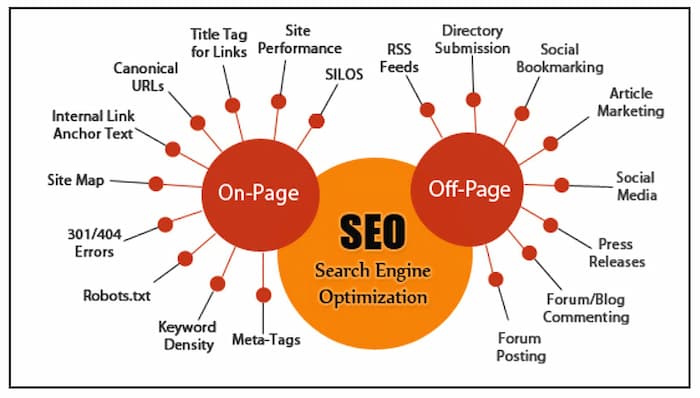
On-page SEO is the art and science of optimizing individual web pages so they rank higher in search engines and attract more relevant traffic. Unlike off-page SEO, which focuses on backlinks and external signals, on-page SEO is all about the elements you have direct control over—things like your content, headers, URL structure, images, and meta tags.
Think of on-page SEO as setting up a store. You could have the best products, but if the signage is confusing, the aisles are cluttered, or the entrance is hidden, people will pass by without noticing. On-page SEO is essentially arranging the shelves, labeling the products, and making sure your store is easy to navigate—so both visitors and search engines can find exactly what they need.
In this article, we’ll dive into 10 essential on-page SEO techniques that can skyrocket your content’s visibility. From keyword optimization to mobile responsiveness, internal linking, and structured data, you’ll discover practical ways to make your website search-engine-friendly while keeping readers engaged.
Understanding On-Page SEO
Before diving into techniques, let’s get the foundation right. On-page SEO refers to the strategies applied directly on your website to improve rankings. Unlike off-page factors like backlinks or social signals, on-page SEO focuses on elements you can control.
Definition of On-Page SEO
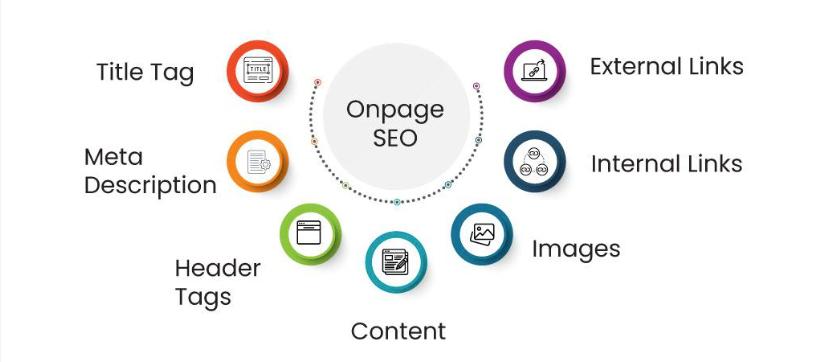
On-page SEO is the practice of optimizing individual pages on your website so they are more understandable and appealing to search engines. It involves both content and HTML source code optimizations. This includes:
- Keywords in content
- Title tags and meta descriptions
- Header tags (H1, H2, H3…)
- Image alt text
- URL structure
- Internal linking
Difference Between On-Page and Off-Page SEO
-
On-page SEO: Factors you control on your website. Examples include content quality, meta tags, headings, and internal links.
-
Off-page SEO: External signals that influence rankings, like backlinks, social shares, and brand mentions.
Focusing on on-page SEO ensures that your site is structured, readable, and optimized for both search engines and visitors. Without it, even the best backlinks won’t guarantee high rankings.
Why On-Page SEO Matters for Content Visibility
Search engines like Google want to deliver the most relevant content to users. On-page SEO helps search engines:
- Understand your content’s topic.
- Assess its relevance for specific search queries.
- Evaluate the user experience and credibility of your page.
In simple terms, optimizing your on-page SEO is like giving search engines a roadmap. Without it, they might get lost trying to figure out what your page is about.
Keyword Research and Optimization
Keywords are the heart of SEO. They act as the bridge between what people are searching for and the content you create. But keyword optimization isn’t about stuffing as many keywords as possible—it’s about strategic placement and relevance.
Importance of Keywords in On-Page SEO
Keywords signal to search engines what your content is about. Using the right keywords ensures your page appears in relevant search results, driving targeted traffic. Think of it as matchmaking—your content meets users’ queries.
How to Find the Right Keywords
- Use Keyword Tools: Google Keyword Planner, Ahrefs, SEMrush, and Ubersuggest help find high-volume, low-competition keywords.
- Analyze Competitors: See which keywords top-ranking pages are using.
- Focus on Search Intent: Understand whether users are looking to buy, learn, or compare—and tailor your content accordingly.
Placement of Keywords in Content
Strategic placement matters. Include your primary keyword in:
- Title tag
- First 100 words of content
- Headers (H2, H3)
- Meta description
- URL slug
- Naturally throughout the content
Avoid keyword stuffing. Overusing keywords can harm readability and SEO performance. Instead, aim for natural integration that flows with your content.
Optimizing Title Tags
Title tags are one of the most important on-page SEO elements. They’re like the cover of a book—if it doesn’t grab attention, no one clicks.
What is a Title Tag
A title tag is an HTML element specifying the title of a web page. Search engines display it in search results as the clickable headline. A well-crafted title tag can improve click-through rates and rankings.
How to Craft SEO-Friendly Title Tags
- Keep it under 60 characters.
- Include primary keywords naturally.
- Make it compelling for users.
- Use brand names sparingly at the end if relevant.
Example:
- Weak title: “Tips for SEO”
- Strong title: “10 Proven On-Page SEO Techniques to Boost Your Rankings”
Common Mistakes to Avoid
- Keyword stuffing
- Duplicate title tags across pages
- Overly long or vague titles
Crafting Meta Descriptions
Meta descriptions are short snippets that appear under your title in search results. They don’t directly affect rankings, but they influence click-through rates, which indirectly impacts SEO.
Role of Meta Descriptions in SEO
Meta descriptions act as your page’s elevator pitch. They tell searchers what your content is about and why they should click. A compelling meta description can significantly increase traffic.
Tips for Writing Effective Meta Descriptions
- Keep it 150–160 characters.
- Include primary keywords naturally.
- Use actionable language like “Learn,” “Discover,” or “Boost.”
- Highlight benefits or unique points.
How Meta Descriptions Affect Click-Through Rates
Even if your page ranks #1, a poor meta description can reduce clicks. Conversely, a well-written meta description can boost traffic from lower-ranking positions, making it a powerful conversion tool.
Using Header Tags Strategically
Header tags (H1, H2, H3, etc.) play a vital role in structuring your content. They guide readers through your article and help search engines understand the hierarchy and main topics of your page. Think of headers as signposts along a trail—they make navigation easy.
Importance of H1, H2, H3 Tags
- H1 Tag: This is the main title of your page. Each page should have only one H1 that clearly defines the topic.
- H2 Tags: These are primary subheadings that break content into sections. They help readers scan your content and provide SEO context.
- H3 and H4 Tags: Used for subsections under H2 headings, adding more granularity to your content.
How to Organize Content with Header Tags
- Start with a clear H1 title that contains your main keyword.
- Break sections logically using H2 tags—each should cover a distinct idea.
- Use H3 and H4 tags to subdivide complex sections or lists.
- Ensure headers are descriptive, not vague or repetitive.
Best Practices for Header Tag Optimization
- Include keywords naturally in headers.
- Keep them concise—avoid overly long phrases.
- Make them engaging to encourage reading.
- Use headers consistently to create a clear structure.
Proper use of header tags improves both user experience and search engine readability, which can boost rankings and reduce bounce rates.
URL Structure Optimization
URLs are more than just a web address—they provide clues to both users and search engines about the content of a page. A clean, descriptive URL can improve SEO and usability.
SEO-Friendly URLs Explained
An SEO-friendly URL is:
- Short and easy to read
- Descriptive of the page content
- Keyword-rich but natural
Example:
- Poor URL:
www.example.com/page?id=12345 - Optimized URL:
www.example.com/on-page-seo-techniques
How to Structure URLs for Better Rankings
- Include primary keywords in the URL.
- Use hyphens to separate words, not underscores.
- Avoid unnecessary numbers or symbols.
- Keep URLs under 60 characters if possible.
Examples of Optimized vs. Poor URLs
A clean URL improves click-through rates, readability, and indexing efficiency.
Content Optimization Techniques
Content is king—but not just any content. To rank high, your content needs to be valuable, relevant, and optimized.
Writing High-Quality, Engaging Content
- Focus on solving user problems.
- Write in a conversational tone; avoid robotic phrasing.
- Include examples, stories, or case studies to enhance credibility.
- Break content into scannable sections using bullet points, tables, and visuals.
Keyword Density and Natural Integration
- Aim for 1–2% keyword density.
- Use synonyms and related keywords to avoid repetition.
- Integrate keywords naturally in the first 100 words, headers, and throughout paragraphs.
Using LSI (Latent Semantic Indexing) Keywords
LSI keywords are semantically related terms that help search engines understand your topic more deeply. For instance, for the main keyword “on-page SEO,” related LSI keywords might include:
- “content optimization”
- “meta tags”
- “internal linking”
Using LSI keywords prevents keyword stuffing and improves relevance, boosting your chances of ranking for multiple related search terms.
Optimizing Images and Multimedia
Visuals enhance user experience and keep readers engaged. However, unoptimized images can slow your site and harm SEO.
Importance of Image Optimization
- Faster page loading
- Better accessibility
- Improved search engine rankings through image search
Best Practices for Alt Text and File Names
- Alt text should describe the image clearly and include keywords where relevant.
- Rename image files descriptively:
seo-on-page-techniques.jpginstead ofIMG12345.jpg. - Use responsive images to ensure proper display on all devices.
Compressing Images for Speed Without Losing Quality
- Tools like TinyPNG or ImageOptim reduce file size.
- Large images can slow down loading times, impacting rankings and user experience.
- Maintain a balance between quality and speed—blurry images hurt credibility.
Optimized images not only improve SEO but also enhance accessibility for visually impaired users, making your website more inclusive.
Internal Linking Strategies
Internal links connect pages within your website, guiding both users and search engines. Think of them as a roadmap that distributes authority and boosts discoverability.
Benefits of Internal Linking for SEO
- Helps search engines crawl and index your site more effectively.
- Spreads link equity across important pages.
- Improves user navigation and engagement.
How to Choose Pages to Link
- Link to relevant content that complements the current page.
- Prioritize pages that need ranking support.
- Avoid overlinking, which can confuse readers and dilute SEO value.
Best Practices for Anchor Text
- Use descriptive, keyword-rich anchors.
- Avoid generic terms like “click here.”
- Keep links natural within the context of your content.
Proper internal linking not only helps SEO but also keeps visitors engaged longer, reducing bounce rates and boosting overall site performance.
Improving Page Load Speed
Page speed is more than a convenience—it’s a critical ranking factor. Users are impatient; if your page takes more than a few seconds to load, they’ll click away. Google recognizes this behavior, making fast-loading pages essential for SEO.
How Page Speed Impacts SEO
- User Experience: Slow pages frustrate users, increasing bounce rates.
- Rankings: Google favors fast-loading pages in search results.
- Conversions: Faster pages lead to higher engagement and better sales or leads.
Tools to Test Website Speed
- Google PageSpeed Insights: Provides performance scores and optimization tips.
- GTmetrix: Detailed insights on page load time, total requests, and recommendations.
- Pingdom: Offers speed testing and monitoring from multiple locations.
Techniques to Improve Loading Times
- Optimize Images: Compress without losing quality.
- Enable Browser Caching: Store resources locally for faster reloads.
- Minify CSS, JavaScript, and HTML: Remove unnecessary characters and spaces.
- Use a Content Delivery Network (CDN): Distribute content globally for faster access.
- Reduce Redirects: Each redirect adds extra load time.
By improving page speed, you not only boost SEO but also create a seamless experience that keeps users engaged.
Mobile Optimization
With mobile devices accounting for over 60% of web traffic, mobile optimization is no longer optional—it’s essential. Google also uses mobile-first indexing, meaning it primarily evaluates your mobile version for rankings.
Why Mobile-Friendly Sites Are Crucial
- Better Rankings: Mobile-friendly sites are prioritized in Google search.
- User Engagement: Mobile users expect fast, responsive designs.
- Reduced Bounce Rates: Poor mobile experience drives users away quickly.
Best Practices for Mobile Optimization
- Use responsive design that adapts to all screen sizes.
- Make buttons and links tappable without zooming.
- Optimize images and videos for smaller screens.
- Ensure readable font sizes and clear navigation menus.
Accelerated Mobile Pages (AMP) Benefits
- AMP pages load almost instantly, improving user experience.
- They increase chances of appearing in rich snippets or carousels on Google.
- AMP can reduce bounce rates and improve mobile search visibility.
Optimizing for mobile isn’t just a trend—it’s a necessity if you want your content to reach the majority of users effectively.
User Experience (UX) and SEO
Search engines increasingly prioritize user experience as a ranking factor. If visitors struggle to navigate your site or find content, it signals poor quality, impacting rankings.
How UX Affects Rankings
- Bounce Rate: Frustrated users leave, reducing dwell time.
- Engagement Metrics: Pages that encourage clicks, scrolls, and shares perform better.
- Accessibility: Sites that are easy to use for all users rank higher.
Improving Navigation and Readability
- Use clear menus and categories.
- Break content into short paragraphs and bullet points.
- Highlight key points with bold text, images, and tables.
- Include a search bar for quick content access.
Reducing Bounce Rates Through UX
- Avoid intrusive pop-ups.
- Ensure fast loading and mobile responsiveness.
- Provide internal links to related content.
A great UX not only improves SEO but creates loyal visitors who stay, explore, and convert.
Schema Markup and Structured Data
Schema markup is a type of code added to your site to help search engines understand your content better. It can enhance listings with rich snippets, improving CTR and visibility.
What is Schema Markup
- A semantic vocabulary of tags for HTML.
- Helps search engines interpret context, not just keywords.
- Examples: ratings, events, recipes, FAQs, and products.
How Structured Data Helps Search Engines
- Makes content eligible for rich snippets in SERPs.
- Improves click-through rates by making listings more attractive.
- Helps Google display enhanced search results with images, reviews, and ratings.
Examples of Useful Schema Types
- Article Schema: Highlights author, date, and headline.
- FAQ Schema: Displays questions and answers directly in search results.
- Product Schema: Shows prices, ratings, and availability.
Using schema markup isn’t mandatory, but it gives your content a competitive edge in search listings.
Content Freshness and Updates
Search engines love fresh content. Updating your content regularly signals relevance and authority. Evergreen content should be revisited periodically to maintain its value.
Why Updating Content Matters
- Keeps your website relevant for users and search engines.
- Improves rankings for previously published content.
- Fixes broken links, outdated statistics, and missing references.
How to Refresh Old Articles for SEO
- Update outdated information and statistics.
- Add new sections, examples, or visuals.
- Revise titles, headers, and meta descriptions.
- Re-optimize keywords and internal links.
Monitoring Content Performance
- Use Google Analytics to track page views and engagement.
- Monitor search rankings for targeted keywords.
- Update content that is losing traffic to regain visibility.
Regular updates maintain your site’s authority and relevance, ensuring it continues to attract both users and search engines.
Conclusion
On-page SEO is the foundation of your website’s visibility. By mastering techniques like keyword optimization, header structuring, URL optimization, internal linking, image optimization, mobile responsiveness, page speed, UX, schema markup, and content freshness, you can dramatically improve your rankings and user engagement.
Remember, on-page SEO isn’t a one-time task—it’s an ongoing strategy. Each tweak, update, and optimization compounds over time, making your site more authoritative and easier for both users and search engines to navigate. By implementing these 10 powerful on-page SEO techniques, you’re setting your content up for long-term success.
FAQs
1. What is the difference between on-page and off-page SEO?
On-page SEO involves optimizations directly on your website, like content, headers, and meta tags. Off-page SEO includes external factors like backlinks, social shares, and brand mentions.
2. How often should I update my content for SEO?
It depends on the topic, but generally, review content every 6–12 months to update outdated information, statistics, and keywords.
3. Can images really impact my SEO ranking?
Yes! Optimized images improve page speed, accessibility, and indexing. Alt text and descriptive filenames also help search engines understand your content.
4. How do I choose the right keywords for my page?
Use keyword research tools, analyze competitors, and focus on search intent to select high-relevance, low-competition keywords for your content.
5. Is mobile optimization really necessary for SEO?
Absolutely. Mobile-friendly sites rank higher, provide a better user experience, and reduce bounce rates, all of which affect search engine rankings.