
Introduction
JavaScript performance isn’t just a “nice-to-have” anymore. It’s the difference between a website that feels smooth and one that makes users sigh, roll their eyes, and quietly close the tab. We live in an age where people expect instant responses. If your page takes more than a couple of seconds to respond, users notice—and they don’t forgive easily. Performance affects everything: user experience, conversion rates, SEO rankings, and even how professional your product feels.
Think of JavaScript like the engine of your car. You might have a beautiful design (the body) and solid hosting (the road), but if the engine sputters, the whole ride feels bad. Modern web apps rely heavily on JavaScript for rendering, data handling, animations, and interactivity. That power comes at a cost. Poorly optimized JavaScript can block rendering, eat memory, drain batteries, and slow everything to a crawl—especially on mobile devices.
What makes performance optimization tricky is that JavaScript is deceptively easy to write but surprisingly hard to optimize well. A few innocent-looking lines can cause massive slowdowns. A loop in the wrong place, an event handler firing too often, or excessive DOM manipulation can quietly sabotage your app.
The good news? You don’t need to rewrite everything or become a performance wizard overnight. Small, intentional improvements can lead to huge gains. In this guide, we’ll walk through 7 practical, battle-tested JavaScript performance optimization techniques that actually make a difference. No fluff. No theory overload. Just real-world strategies you can start using today to speed up your code and deliver a smoother experience.
Let’s pop the hood and see what’s slowing your JavaScript down.
Understanding JavaScript Performance at a High Level
Before optimizing anything, it helps to understand what you’re actually optimizing. JavaScript performance issues often feel mysterious, but once you understand how the browser handles your code, things start to click. Performance problems usually aren’t random—they’re predictable side effects of how JavaScript executes and interacts with the browser.
At a high level, JavaScript runs on a single main thread. That means it shares space with rendering, layout calculations, and user interactions. When your JavaScript takes too long to execute, it blocks everything else. The result? Frozen screens, delayed clicks, janky animations, and frustrated users.
Another key factor is how JavaScript talks to the DOM. The DOM isn’t JavaScript—it’s a separate system. Every time your code touches it, the browser may need to recalculate layouts and repaint pixels. Do that too often, and performance tanks fast.
Memory also plays a role. JavaScript engines are good at managing memory, but they’re not magicians. Leaky event listeners, unused objects, and heavy data structures can increase memory usage and slow garbage collection. Over time, this degrades performance, especially in long-running applications like dashboards or SPAs.
Finally, device diversity matters. Your blazing-fast desktop might hide problems that cripple mid-range smartphones. Performance optimization isn’t about making code “fast enough for me.” It’s about making it fast enough for everyone.
Understanding these fundamentals helps you optimize with intention instead of guesswork. Now, let’s break things down and start with one of the biggest performance killers in JavaScript: the DOM.
Technique 1: Optimize DOM Manipulation
If JavaScript performance had a “most wanted” list, excessive DOM manipulation would be right at the top. The DOM is powerful, but it’s also expensive. Every change you make—adding elements, changing styles, updating text—forces the browser to stop and think. Do this too often, and your app starts feeling sluggish.
The core issue is that DOM operations can trigger reflows and repaints. A reflow recalculates the layout of the page, while a repaint redraws pixels. Both are costly, especially when repeated in tight loops or frequent updates. The browser tries to optimize this, but it can only do so much if your code keeps poking the DOM.
- One common mistake is updating the DOM piece by piece. For example, appending elements inside a loop might look harmless, but each append can trigger layout calculations. Multiply that by hundreds or thousands of elements, and you’ve got a performance nightmare.
- A better approach is batching changes. Build your elements in memory first, then update the DOM in one go. Techniques like document fragments allow you to assemble content off-screen and inject it all at once. This dramatically reduces layout thrashing and speeds things up.
- Another smart move is minimizing style changes. Changing multiple CSS properties individually can trigger repeated reflows. Instead, toggle CSS classes or use inline styles sparingly. Think of it like repainting a room—you wouldn’t repaint one wall at a time while moving furniture around each time.
- Also, cache DOM references. Querying the DOM repeatedly using selectors is slower than storing a reference once and reusing it. This simple habit can lead to noticeable improvements, especially in frequently executed code.
- Optimizing DOM manipulation is about respect—respecting how expensive it is. Treat the DOM like a fragile resource, and your performance will thank you.
Technique 2: Minimize and Optimize Loops
Loops are everywhere in JavaScript, and that’s exactly why they’re dangerous. A loop that runs a few times is harmless. A loop that runs thousands of times with inefficient logic can quietly drag your app down. Loop optimization isn’t about avoiding loops—it’s about being intentional with them.
- One of the easiest wins is avoiding unnecessary work inside loops. If you’re calculating the same value on every iteration, move it outside the loop. It sounds obvious, yet it’s one of the most common performance mistakes. JavaScript will happily repeat expensive operations unless you tell it otherwise.
- Choosing the right loop also matters. Traditional
forloops are often faster than higher-order methods likeforEach,map, orfilter, especially in performance-critical sections. That doesn’t mean you should never use modern methods—but you should know when performance matters more than readability. - Early exits are another underrated optimization. If you’re searching for a value, break out of the loop as soon as you find it. Don’t let the loop run just because it can. Every extra iteration is wasted time.
- In some cases, loop unrolling can help, though this is more advanced and situational. The key idea is reducing the overhead of loop control. While modern engines are good at optimizing loops, clear and simple logic always performs better than clever-but-complex code.
- Loops are like treadmills. Used correctly, they build strength. Used carelessly, they just make you tired without going anywhere. Optimize them, and your JavaScript will run leaner and faster.
Technique 3: Use Efficient Data Structures
Choosing the wrong data structure in JavaScript is like using a spoon to cut a steak. You might eventually get there, but it’s going to be slow and frustrating. JavaScript gives you several options—arrays, objects, maps, sets—and each one has strengths and weaknesses.
- Arrays are great for ordered lists, but they’re not ideal for frequent lookups by key. Objects work well for simple key-value storage, but they come with quirks, especially when dealing with inheritance or dynamic keys. That’s where
MapandSetshine. - Maps are optimized for frequent additions and lookups. They maintain insertion order and handle keys of any type without string conversion. If you’re storing lots of data and accessing it often, a
Mapcan significantly outperform a plain object. - Sets are perfect when uniqueness matters. Instead of checking if a value already exists in an array—a process that can be slow—sets give you instant lookups. This can drastically improve performance in scenarios like filtering duplicates or tracking active states.
- Using the right data structure reduces computational complexity. That means fewer operations, less memory churn, and faster execution. Over time, these gains add up, especially in data-heavy applications.
- Think of data structures as tools in a toolbox. You wouldn’t use a hammer for every job. Choose wisely, and your JavaScript will feel effortlessly fast.
Technique 4: Reduce JavaScript File Size
Big JavaScript files are slow JavaScript files. It’s that simple. The browser has to download, parse, and execute every byte. The larger the file, the longer this process takes—and it all happens before users can interact with your page.
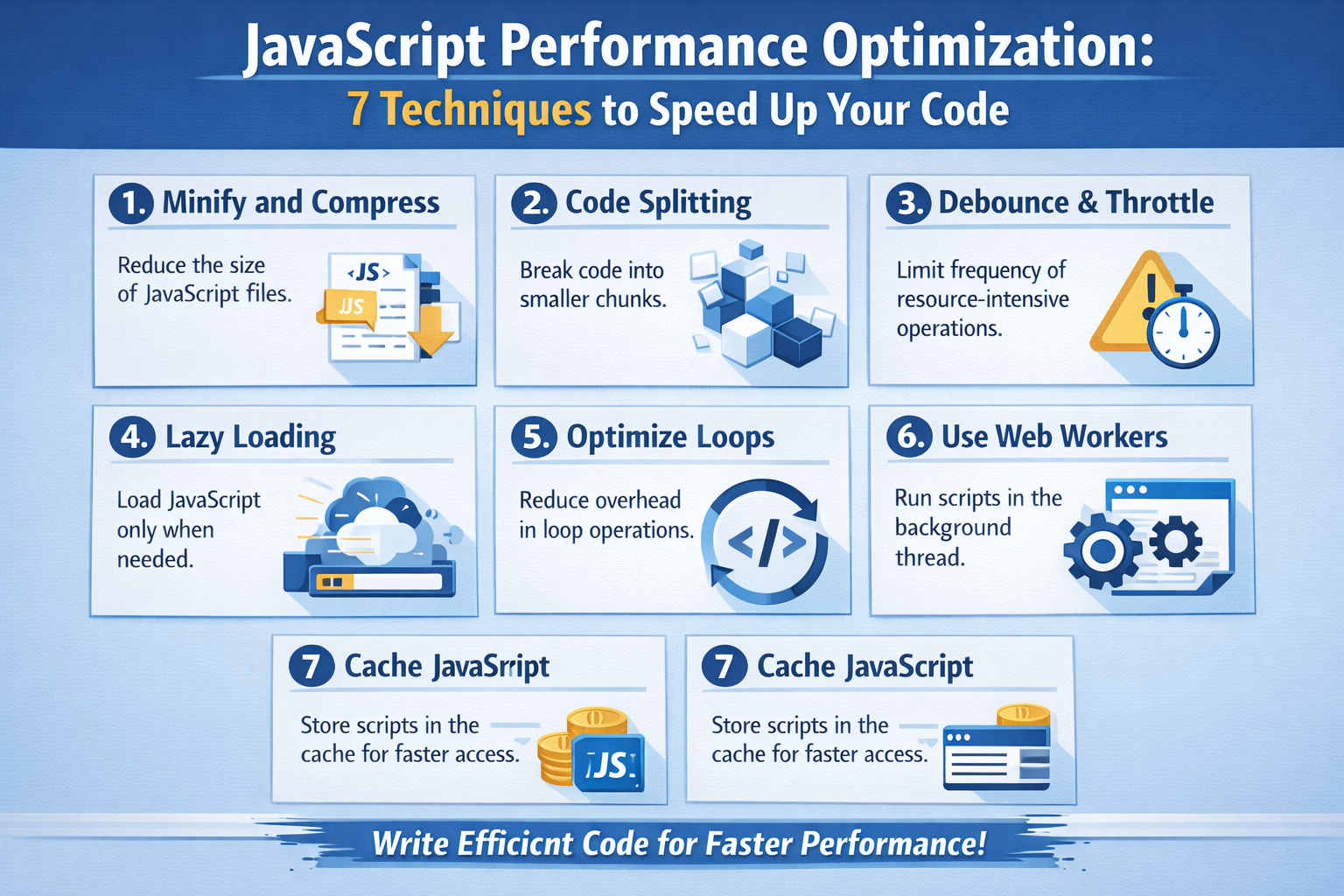
- Minification is the first line of defense. Removing whitespace, comments, and unnecessary characters can shrink file sizes dramatically without changing functionality. Compression techniques like Gzip or Brotli take things even further, squeezing files down to a fraction of their original size.
- Tree shaking is another powerful optimization. It removes unused code from your bundles, ensuring users only download what they actually need. Modern build tools make this easier than ever, but it requires writing modular, clean code.
- Code splitting takes performance to the next level. Instead of loading everything upfront, you load only what’s necessary and defer the rest. This improves initial load times and makes your app feel faster, even if it’s doing a lot behind the scenes.
- Reducing file size is like packing light for a trip. The less you carry, the faster you move.
Event handling is one of those areas where JavaScript performance issues hide in plain sight. Clicks, scrolls, resizes, mouse movements—modern web apps listen to a lot of events. The problem? Some of these events fire way more often than you think. A scroll event, for example, can trigger dozens of times per second. If your handler does heavy work each time, performance will crumble fast.
- A classic mistake is attaching event listeners to multiple child elements when one parent listener would do the job. This is where event delegation comes in. Instead of adding listeners to each item in a list, attach a single listener to the parent and determine the target dynamically. This reduces memory usage and speeds up event processing, especially in dynamic interfaces where elements are frequently added or removed.
- Then there’s debouncing and throttling, two lifesavers for performance. Debouncing ensures a function runs only after an event stops firing—perfect for search inputs or resize events. Throttling, on the other hand, limits how often a function can run within a given time window, making it ideal for scroll-based interactions. Without these techniques, your app may be doing far more work than necessary.
- Memory leaks are another silent performance killer. Forgetting to remove event listeners when elements are destroyed keeps references alive and prevents garbage collection. Over time, this bloats memory usage and slows everything down. Cleaning up listeners isn’t glamorous, but it’s essential for long-running applications.
- Optimized event handling is about control. You’re telling JavaScript, “Only work when it really matters.” And that discipline pays off in smoother, faster applications.
Technique 6: Leverage Asynchronous Programming
JavaScript’s single-threaded nature often gets blamed for performance issues, but the real problem is how we use it. Asynchronous programming is your secret weapon for keeping apps responsive while doing heavy work behind the scenes.
- At the heart of this is the event loop. When long-running tasks block the main thread, everything else—UI updates, user input, animations—comes to a halt. Asynchronous patterns like callbacks, promises, and
async/awaitallow you to offload work and keep the main thread free. - Using
async/awaitisn’t just about cleaner syntax. It encourages non-blocking logic and makes it easier to reason about asynchronous flows. When used correctly, it helps prevent long chains of synchronous operations that freeze the UI. - For truly heavy computations, Web Workers are a game-changer. They run JavaScript in a separate thread, allowing you to process large datasets or complex calculations without impacting user interactions. While communication with workers has overhead, the performance gains are often worth it for CPU-intensive tasks.
- Asynchronous programming is like multitasking done right. You’re not doing everything at once—you’re doing things at the right time, in the right place.
Technique 7: Optimize Rendering and Animations
Nothing exposes performance problems faster than animations. Stuttering transitions, delayed hover effects, and janky scrolling instantly break the illusion of quality. Optimizing rendering and animations is essential for delivering a smooth experience.
- One golden rule: use
requestAnimationFramefor visual updates. It syncs your code with the browser’s rendering cycle, ensuring animations run at the optimal time. This prevents unnecessary redraws and makes motion feel fluid. - Another important principle is knowing when CSS beats JavaScript. CSS animations and transitions are often hardware-accelerated and handled more efficiently by the browser. JavaScript-driven animations should be reserved for cases where logic is too complex for CSS alone.
- Avoiding layout thrashing is critical. This happens when code repeatedly reads layout properties (like
offsetHeight) and writes styles in quick succession. Each read can force the browser to recalculate layout. Group reads together, then writes together, to minimize reflows. - Smooth rendering isn’t about fancy effects—it’s about consistency. Even simple animations feel premium when they’re smooth and responsive.
Performance Measurement and Monitoring
You can’t optimize what you don’t measure. Performance tuning without data is just guesswork. Fortunately, modern browsers offer powerful tools to help you understand exactly what’s happening under the hood.
- Browser DevTools allow you to record performance timelines, inspect long tasks, and identify bottlenecks. You can see which functions consume the most time and how often reflows occur. This insight is invaluable for targeted optimization.
- Real User Monitoring (RUM) takes things further by measuring performance in the wild. It shows how real users experience your app across devices and network conditions. Often, this data reveals issues that never appear in local testing.
- Setting performance budgets helps keep things under control. By defining limits for bundle size, load time, or execution time, you prevent regressions before they reach production. Performance becomes a standard, not an afterthought.
- Measurement turns optimization from art into science.
Best Practices for Long-Term JavaScript Performance
Performance optimization isn’t a one-time task—it’s a habit. Writing clean, modular code makes it easier for engines to optimize and for developers to reason about performance. Simpler code often runs faster than overly clever solutions.
Regular refactoring keeps performance debt from piling up. As features evolve, old assumptions break. Revisiting code ensures it still meets performance expectations.
- Testing on real devices, especially mid-range mobile phones, keeps you honest. If it runs well there, it’ll fly everywhere else.
- Consistency is the real secret. Small improvements, applied consistently, lead to massive long-term gains.
Common JavaScript Performance Myths
One common myth is that modern engines make optimization unnecessary. While engines are smart, they can’t fix poor architecture. Another myth is that micro-optimizations don’t matter. Individually, maybe not—but collectively, they absolutely do.
Performance isn’t about obsessing over nanoseconds. It’s about respecting the user’s time.
Conclusion
JavaScript performance optimization is less about tricks and more about mindset. When you write code with performance in mind—minimizing DOM work, choosing the right data structures, handling events wisely, and measuring real-world impact—you naturally create faster, smoother applications.
The seven techniques covered here aren’t theoretical. They’re practical habits that compound over time. Apply them consistently, and your JavaScript won’t just work—it’ll fly.
FAQs
1. Does JavaScript performance affect SEO?
Yes. Faster pages improve user experience and reduce bounce rates, which search engines reward.
2. Are modern frameworks automatically optimized?
They help, but poor usage can still cause performance issues.
3. Is minification enough for performance?
No. It helps load time, but execution and rendering optimizations are equally important.
4. How often should I profile performance?
Regularly—especially after adding new features or dependencies.
5. What’s the biggest performance mistake developers make?
Overusing the DOM without understanding its cost.