
JavaScript Array Methods: 7 Techniques to Master Array

Introduction

Have you ever stared at a long list of numbers or names in your code and felt your brain freeze? I get it. We’ve all been there. One moment you’re excited to start coding, and the next moment the array starts looking like a giant bowl of tangled noodles. I remember the first time I tried to work with arrays; I pressed so many keys out of fear that my editor started crying. But trust me, once you learn a few smart ways to handle arrays, everything becomes smoother—like sliding on a freshly mopped floor.

Picture this: You’re building a small project. Maybe a shopping cart, a marks calculator, or a list of students. Suddenly, your data grows and grows. You try printing everything one by one, and your console looks like a messy notebook from school. That’s when JavaScript array methods walk in like superheroes. These methods don’t just store data—they help you transform it, clean it, search it, and even reshape it with very little effort.

And let me tell you a secret: in 2025, companies expect you to know these methods. They’re simple, powerful, and everywhere. If you’re learning JavaScript Array for the first time, this guide will be your friendly map. I’ll walk with you step by step, and by the end, you’ll feel like arrays are your best friends.

Why JavaScript Array Matters

A JavaScript Array is like a box where you store multiple things—numbers, words, objects, or API responses. Simply storing them isn’t enough. You often need to:

  • Change values
  • Search for certain items
  • Remove unnecessary items
  • Calculate totals
  • Check conditions

That’s where JavaScript Array methods shine. They save time, reduce code complexity, and help you write cleaner, readable code.

What This Article Will Teach You

By the end of this guide, you’ll understand:

  • How each of the 7 most common JavaScript Array methods works
  • When and why to use them
  • Simple, real-world examples
  • How to write smarter, cleaner JavaScript code.
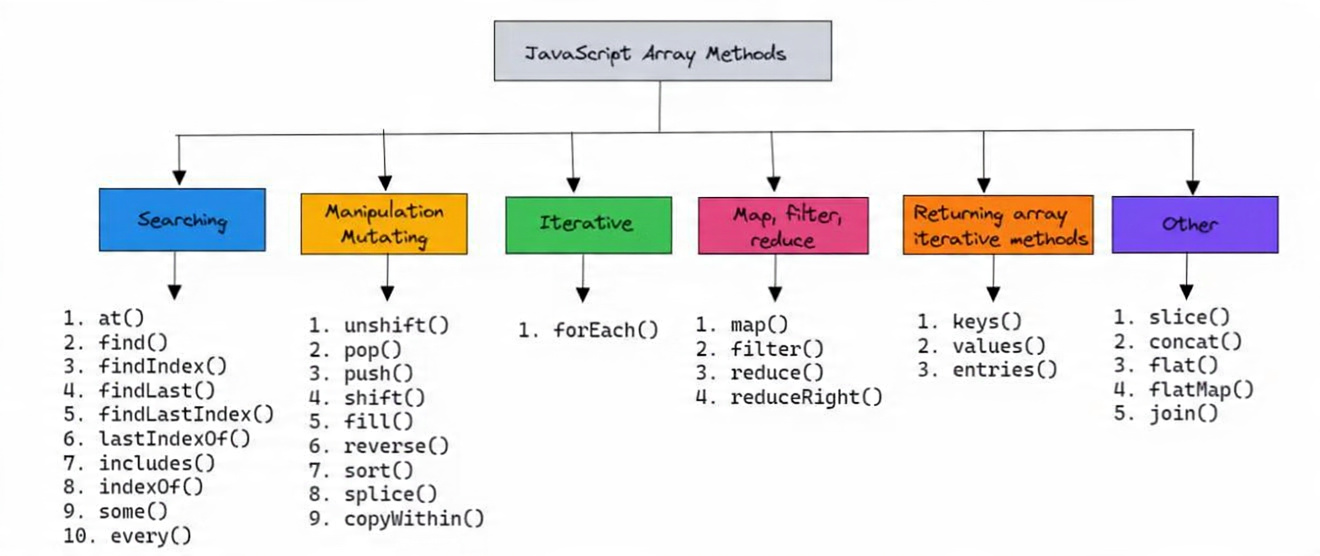
JavaScript Array

1. Map() – Transforming Arrays

When you want to change every item in an array without modifying the original array, map() is your go-to method. Think of it as a factory assembly line: every item comes in, gets processed, and comes out transformed, while the original items remain untouched.

What Does It Do?

The map() method iterates over each element of an array, applies a function to it, and returns a brand-new array with the transformed results. This is perfect when you need to convert values, calculate something, or extract specific properties from objects.

Unlike loops like for or while, map() is cleaner, shorter, and easier to read. It helps you avoid writing repetitive code.

Example 1: Doubling Numbers

let numbers = [2, 4, 6];
let doubled = numbers.map(num => num * 2);
console.log(doubled); // [4, 8, 12]

Here, each number in the numbers array is doubled, and a new array is returned. The original numbers array remains [2, 4, 6].

Example 2: Extracting Properties from Objects

let users = [
{name: "Alice", age: 25},
{name: "Bob", age: 30},
{name: "Charlie", age: 35}
];
let names = users.map(user => user.name);
console.log(names); // [“Alice”, “Bob”, “Charlie”]

You can quickly extract just the names without modifying the original users array.

Real-World Analogy

Imagine a classroom where every student gets a worksheet. You want each student to add 10 points to their score. Instead of updating each score manually, you apply the rule to all at once — that’s exactly how map() works.

Another example: imagine you have a list of products with prices in dollars, and you want to convert them to rupees. map() is your magic converter.

Advanced Tips for map()

  • Combine map() with other methods: Often, map() is used together with filter() or reduce() to transform and filter data efficiently.
  • Keep functions pure: Ensure the function inside map() doesn’t have side effects (like modifying the original array). This keeps your code predictable.
  • Use arrow functions for readability:
let squared = [1,2,3].map(x => x*x);

This is cleaner than writing a separate function for small transformations.

Key Takeaways – map()

  • Creates a new array; original remains unchanged.
  • Ideal for transforming arrays or extracting properties.
  • Cleaner and more readable than loops.
  • Can be combined with other array methods for powerful data processing.
  • Works on arrays of numbers, strings, objects, or any complex data.

 2.filter() – Choosing Only What You

The filter() method is used when you want only the items that match a specific condition. It returns a new array containing only the elements that satisfy the condition, leaving the original array untouched.

Think of it like a sieve: you pour in everything, and only the items that meet your criteria pass through.

What Does filter() Do?

filter() goes through each element of the array and checks a condition (provided as a function). If the condition is true, that element is included in the new array. Otherwise, it’s ignored.

Unlike loops, filter() keeps your code short, clean, and readable.

Example 1: Filtering Numbers

let marks = [80, 45, 92, 33, 60];
let passed = marks.filter(m => m >= 50);
console.log(passed); // [80, 92, 60]

Here, only the marks greater than or equal to 50 are kept in the new array. The original marks array remains [80, 45, 92, 33, 60].

Example 2: Filtering Objects

let users = [
{name: "Alice", age: 25},
{name: "Bob", age: 17},
{name: "Charlie", age: 30}
];
let adults = users.filter(user => user.age >= 18);
console.log(adults);
// [{name: "Alice", age: 25}, {name: "Charlie", age: 30}]

Real-World Analogy

Imagine you’re sorting your email inbox. You only want the emails that are unread or important. Using filter(), you can quickly create a new list of relevant emails while ignoring the rest.

Another analogy: think of a fruit market. You only want ripe mangoes. The rest stay in the basket; only the ripe ones pass through.

Advanced Tips for filter()

  • Combine filter() with map() – After filtering the items, you can immediately transform them with map().
let prices = [100, 200, 50, 400];
let expensivePrices = prices.filter(p => p > 100).map(p => `$${p}`);
console.log(expensivePrices); // ['$200', '$400']


  • Use multiple conditions – You can combine conditions with && (AND) or || (OR).
let numbers = [5, 12, 18, 7, 25];
let result = numbers.filter(n => n > 10 && n < 20);
console.log(result); // [12, 18]


  • Check for specific properties – When working with objects, check if a property exists or matches a value.
let products = [
{name: "Pen", stock: 10},
{name: "Notebook"},
{name: "Pencil", stock: 5}
];
let inStock = products.filter(p => p.stock);
console.log(inStock);
// [{name: "Pen", stock: 10}, {name: "Pencil", stock: 5}]

Key Takeaways – filter()

  • Creates a new array; original array stays unchanged
  • Keeps only items that meet a condition
  • Ideal for cleaning data, filtering lists, or searching
  • Can be combined with map(), reduce(), and other methods for powerful data transformations
  • Works on arrays of numbers, strings, or objects

3.reduce() – Turning Many Into One

The reduce() method is extremely powerful. It allows you to combine all items of an array into a single value. Whether it’s summing numbers, merging strings, or building an object, reduce() can do it.

Think of it as a blender: you throw in multiple ingredients (array items), blend them together, and get a single output.

What Does reduce() Do?

reduce() loops through each element, applies a callback function, and maintains an accumulator (a running total or result). It’s often used for calculations, summaries, or combining items.

Example 1: Sum of Numbers

let prices = [100, 200, 50];
let total = prices.reduce((sum, price) => sum + price, 0);
console.log(total); // 350

Here, the array [100, 200, 50] is reduced to a single value: 350.

Example 2: Flattening an Array of Arrays

let nested = [[1,2], [3,4], [5]];
let flat = nested.reduce((acc, val) => acc.concat(val), []);
console.log(flat); // [1,2,3,4,5]

reduce() combines multiple arrays into a single flat array.

Real-World Analogy

Think of tracking daily earnings in a cafe. Each day, you add your sales to a running total. By the end of the week, you have one total sum — that’s reduce() in action.

Another analogy: imagine a pile of coins; each coin adds to the total, giving one final amount.

Advanced Tips for reduce()

Initial value matters: Always provide an initial value for your accumulator to avoid errors.

Use reduce for objects: You can build new objects from arrays.

let fruits = ["apple", "banana", "apple"];
let count = fruits.reduce((acc, fruit) => {
acc[fruit] = (acc[fruit] || 0) + 1;
return acc;
},
{});
console.log(count); // { apple: 2, banana: 1 }

Chain methods: Combine filter(), map(), and reduce() for advanced data transformations.

Key Takeaways – reduce()

  • Reduces array to single value
  • Works for numbers, strings, objects, arrays
  • Must provide initial value
  • Useful for sums, totals, flattening arrays, counting items

4.find() – Locate a Single Match

find() is perfect when you want to get the first element that matches a condition. Once found, it stops searching, making it efficient for large arrays.

Example 1: Simple Find

let students = ["Aman", "Mina", "Rahul"];
let found = students.find(name => name === "Mina");
console.log(found); // "Mina".

Example 2: Finding an Object

let users = [
{name: "Alice", age: 25},
{name: "Bob", age: 30}
];
let adult = users.find(u => u.age >= 30);
console.log(adult); // {name: "Bob", age: 30}

Real-World Analogy

Looking for a specific key on your keyring. Once you spot it, you stop looking — that’s exactly how find() works.

Advanced Tips for find()

💡 Returns undefined if not found: Always check the result before using it.

let user = users.find(u => u.age > 40)?.name;

💡 Use findIndex() if you need the position of the element instead of the element itself.

Key Takeaways – find()

  • Returns first match
  • Stops early for efficiency
  • Works for numbers, strings, or objects
  • Returns undefined if nothing matches

5.some() – Check If Anything Matches

The some() method checks if at least one element in the array satisfies a condition and returns a Boolean (true or false).

Example 1: Simple Check

let ages = [15, 22, 10, 18];
console.log(ages.some(a => a >= 18)); // true

Example 2: Checking Objects

let users = [
{name: "Alice", active: false},
{name: "Bob", active: true}
];
console.log(users.some(u => u.active)); // true

Even if one user is active, some() returns true.

Real-World Analogy

You open your fridge and ask: “Is there any chocolate left?” If yes → some() returns true.

Advanced Tips for some()

Short-circuit evaluation: Stops once a match is found — efficient for large arrays.

Combine with arrow functions for readability:

let numbers = [1,2,3,4];
let hasEven = numbers.some(n => n % 2 === 0);

Use for validation: Quickly check if any item in a list passes a rule (like password checks).

Key Takeaways – some()

  • Returns true/false
  • Stops early after first match
  • Efficient for large arrays
  • Useful for validations, checks, or conditions

6.forEach() – Do Something for Every Item

forEach() lets you perform an action on every element, without creating a new array.

Example 1: Logging Items

["Ram", "Sita", "Gita"].forEach(name => console.log(name));

Example 2: Updating DOM (Web Example)

let buttons = document.querySelectorAll("button");
buttons.forEach(btn => btn.style.color = "red");

Changes the color of all buttons on a page — very handy in frontend development.

Real-World Analogy

Taking attendance in class. You call each student’s name and mark them as present. You act on each, but don’t create a new list.

Advanced Tips for forEach()

💡 Use for side effects: Perfect for UI updates, logging, or modifying external data.

💡 Cannot break early: Unlike loops, you can’t break from forEach(). Use some() or for…of if you need to stop early.

💡 Combine with map() or filter() carefully: Don’t expect forEach() to return a transformed array — use map() for that.

Key Takeaways – forEach()

  • Performs action for every element
  • Doesn’t return a new array
  • Ideal for logging, UI updates, or side-effects
  • Cannot break early.

7. push() – Adding Items to an Array

push() is the simplest method to add an element to the end of an array. Unlike previous methods, it modifies the original array.

Example 1: Adding a String

let items = ["Pen"];
items.push("Pencil");
console.log(items); // ["Pen", "Pencil"]

Example 2: Adding Multiple Items

let colors = ["Red"];
colors.push("Blue", "Green");
console.log(colors); // ["Red", "Blue", "Green"]

Real-World Analogy

Adding a new book to the end of a bookshelf. The bookshelf changes — just like push() modifies the original array.

Advanced Tips for push()

💡 Adding multiple items: array.push(item1, item2, ...)

💡 Get new length: push() returns the new array length.

💡 Use with spread operator carefully: Sometimes array = [...array, newItem] is preferred to avoid mutating the original.

Key Takeaways – push()

  • Adds items at the end of the array
  • Modifies the original array
  • Returns the new length of the array
  • Works with numbers, strings, objects.

Table

Method Purpose Returns Modifies Array?
map() Transform New Array No
filter() Select New Array No
reduce() Aggregate Any No
find() First match Item No
some() Check one Boolean No
forEach() Action None No
push() Add item New length Yes

 FAQs

1. What is a JavaScript Array?
A JavaScript Array is a variable that can store multiple items like numbers, strings, or objects.

2. How do I create a JavaScript Array?
Use square brackets []:let fruits = ["Apple", "Banana"];

3. How do I transform a JavaScript Array?
Use map() to create a new JavaScript Array with modified values without changing the original.

4. How can I filter a JavaScript Array?
Use filter() to get a new array with only elements that meet a condition.

5. How do I find an item in a JavaScript Array?
find() returns the first element that matches a condition in a JavaScript Array.

6. Can I check a condition in a JavaScript Array?
Yes! Use some() to check if any element in a JavaScript Array satisfies a condition.

7. How do I add items to a JavaScript Array?
Use push() to add elements at the end of a JavaScript Array.

.

Conclusion

JavaScript Array methods are essential tools for every developer. By mastering these 7 techniques, you can handle data more efficiently, write cleaner code, and improve overall performance. Whether you are a beginner or an experienced developer, a strong understanding of JavaScript Array methods will make your coding faster and more effective.

Leave a Comment

Your email address will not be published. Required fields are marked *

Scroll to Top