
Let us describe a scene you probably know too well. A client calls on a Sunday evening. Their site is down. A plugin auto-updated and broke something, or maybe their host had an issue, or perhaps they tried to install something themselves. Whatever the cause, you are now spending your evening digging through files and trying to piece together what went wrong. The worst part is that you knew better. You knew this site needed a proper backup and maintenance setup. You just never got around to it because you were busy with actual billable work.
This is exactly why freelance developers and small agencies need to stop treating WordPress backup and maintenance as separate tasks. In 2026, the landscape has shifted. The old way of installing one plugin for backups, another for updates, a third for uptime monitoring, and maybe a fourth for security scans is simply inefficient. You are paying for multiple subscriptions, logging into multiple dashboards, and spending hours each week on work that should run on autopilot. This article walks through the best WordPress maintenance plugin 2026 options and shows you exactly how to cut your maintenance time by roughly 80 percent without sacrificing reliability.
Why 2026 Demands a Different Approach to WordPress Care
The WordPress ecosystem has changed significantly over the past few years. Sites have grown larger, with more media files, more plugins, and more complex databases. A single WooCommerce store might have thousands of product images and hundreds of customer records. Backing up that entire site using traditional methods could take thirty minutes or more and would slow down the server for everyone visiting the site during that window .
Incremental backups have become the new standard for this exact reason. Instead of copying every single file every time, incremental backup systems only save the changes made since the last backup. A full backup might run once a week, and then daily backups only capture what is new or modified. This approach reduces server load dramatically and makes restoration much faster when you need it .
Another shift happened in the hosting space. Many managed WordPress hosts now offer their own backup solutions, but these almost always come with limitations. A host might keep only seven to fourteen days of backups. If a client discovers a problem that started three weeks ago, those host backups will not help. Worse, if the host itself experiences an outage, your backups go down with the site. Storing backups offsite, meaning on a different service like Google Drive or Dropbox, is no longer optional for agencies that want to protect their clients properly .
The third major change involves automation. Plugins in 2026 can now send branded maintenance reports to clients after every update session, automatically test updates on staging environments before applying them live, and even roll back changes if something breaks. These features were once available only through expensive enterprise tools, but they have now become standard in mid-tier maintenance plugins .
The Real Cost of Manual Maintenance for Agencies
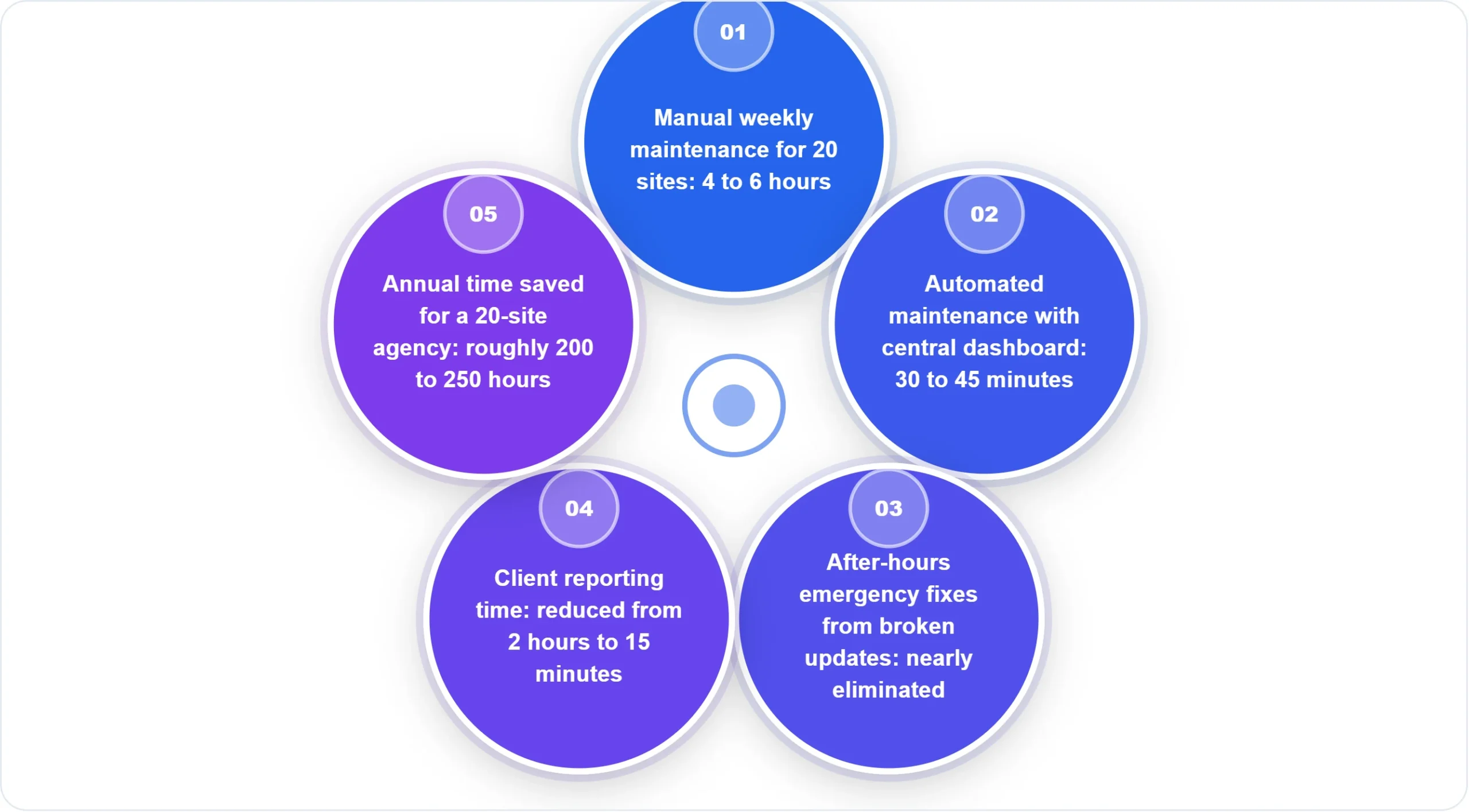
Running updates manually across ten client sites might take two hours each week if everything goes smoothly. That is roughly one hundred hours per year spent clicking update buttons, checking for errors, and hoping nothing breaks. For an agency charging 100perhour,thatis10,000 in lost revenue. The work does not even produce visible results for clients. They do not see the updates you ran. They only notice when something goes wrong .
A proper WordPress backup and maintenance plugin changes this math entirely. Centralized dashboards like ManageWP allow you to see every site you manage from a single screen. You can run updates across twelve sites with one click. The system can even create a backup automatically before each update, then check the site afterward and roll back instantly if something fails. This level of automation transforms a two-hour weekly chore into a five-minute review process .
The financial calculation becomes even more compelling when you factor in the cost of a single site failure. Rebuilding a moderately complex WooCommerce store from scratch could easily cost 2,000to5,000 in developer time. A backup plugin that costs $150 per year suddenly looks like one of the cheapest insurance policies available .
What a Modern All-in-One Plugin Actually Does
Let us be specific about features because the term “maintenance plugin” gets thrown around loosely. A genuine all-in-one solution for agencies should handle at least six core functions. First, it should perform automated backups on a schedule you define, with support for incremental backups to save server resources. Second, it should store those backups in at least one offsite location, and preferably allow you to send copies to multiple cloud services simultaneously .
Third, the plugin should manage WordPress core, plugin, and theme updates with safety features built in. This means creating a backup before every update, running updates sequentially rather than all at once, and verifying site functionality afterward. Fourth, it should include uptime monitoring that alerts you within minutes if a site goes down, not hours later when a client discovers the problem .
Fifth, a modern maintenance plugin should offer staging environments. This allows you to clone a live site, test updates or changes in complete safety, and then push those changes back to the live site when everything works. Sixth, and increasingly important for agencies, the plugin should generate professional client reports that show exactly what maintenance work was performed and when .
Greenskeeper, a newer player in this space, exemplifies the shift toward agency-focused tools. It centralizes update management, logs every action automatically, and builds branded HTML email reports that you can send directly to clients. The plugin even handles SMTP email delivery through nine different providers, eliminating the need for a separate email plugin .
Five Plugins That Deserve Your Attention in 2026
The plugin market has matured significantly, and several options stand out for different use cases. Each has strengths and weaknesses, and the right choice depends heavily on your specific workflow and client base.
UpdraftPlus remains the most popular backup plugin with over five million active installs, and for good reason. The free version is genuinely useful, offering scheduled backups and storage to multiple cloud providers including Google Drive and Dropbox. However, the free version does not include incremental backups, and migration requires a paid addon. The premium version starts at around $70 per year for two sites, which works fine for freelancers with a small client roster but becomes expensive for agencies managing twenty or more sites .
BlogVault takes a different approach by running all backups on their own cloud infrastructure rather than your server. This means zero performance impact on your client sites, which matters significantly for high-traffic WooCommerce stores. The restore feature works even if your WordPress dashboard is completely inaccessible, a critical advantage during emergencies. The main drawback is price. BlogVault starts at about $149 per year for one site, making it one of the more expensive options .
ManageWP deserves special mention because it is not exactly a plugin but rather a central dashboard that connects to a lightweight worker plugin on each site. The core features including updates, monitoring, and monthly backups are free for an unlimited number of sites. Premium features like hourly backups, cloning, and white labeling cost extra but are billed per site per month, so you only pay for what you actually use. This flexible pricing model works exceptionally well for agencies with varying client needs .
All-in-One WP Migration offers an interesting value proposition for agencies. The Pro version costs $99 per year and covers up to fifty sites, making it one of the most affordable options on a per-site basis. The plugin started as a migration tool and added backup features later, so its backup functionality is solid but not as comprehensive as dedicated backup plugins. That said, for agencies that prioritize easy site moves alongside basic backup protection, the pricing is hard to beat .
Visual Summary: Plugin Pricing Comparison for 20 Sites
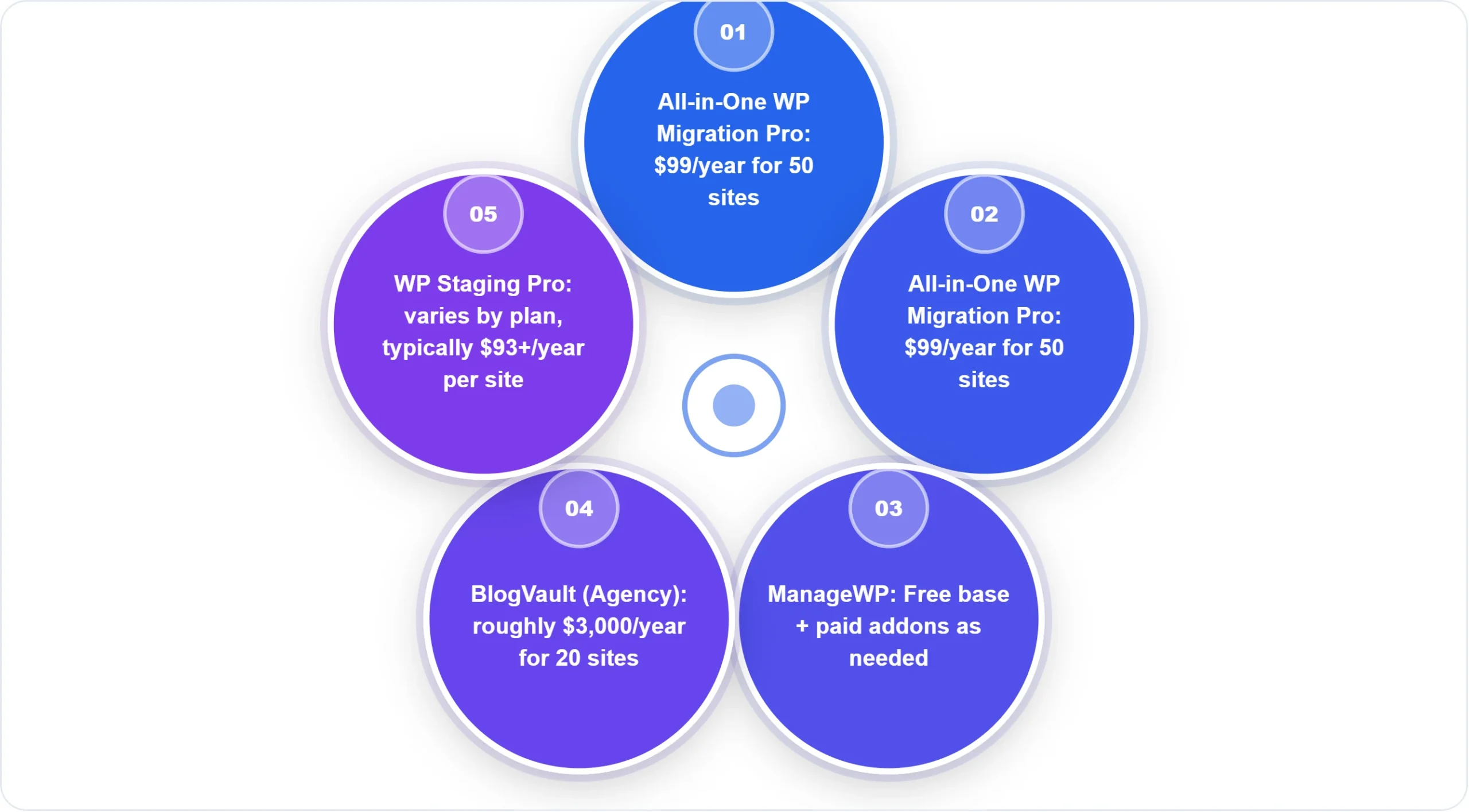
WP Staging takes a different approach by combining backup and staging functionality in a single plugin. If your workflow frequently involves testing changes before pushing them live, having both features in one tool eliminates friction. The free version handles basic cloning and backups, while the Pro version adds cloud storage and scheduled backups. The enterprise-grade code quality stands out, with over one thousand automated tests run on every release .
How to Automate 80 Percent of Your Maintenance Work
The path to automation starts with choosing the right tool for your specific workflow, but the tool alone will not save you time without proper configuration. Let us walk through a setup process that works for most agencies.
Begin by installing a central management dashboard like ManageWP and connecting all your client sites. This single step eliminates the need to log into each site individually for routine tasks. Once connected, configure the update settings to run on a schedule that matches your availability. Many agencies set updates to run automatically at three in the morning when traffic is lowest. With safe update features enabled, the system creates a backup before each update and automatically rolls back if anything breaks .
For backups, configure at least two storage locations. Send one copy to a cloud service like Google Drive or Dropbox, and keep another copy on the plugin provider’s infrastructure if available. This follows the classic 3-2-1 backup rule. Three copies of your data, on two different types of media, with one copy stored offsite. Never store backups exclusively on the same server as the live site because a server failure would destroy both the site and its backups simultaneously .
Client reporting should also run on autopilot. Plugins like Greenskeeper and ManageWP can send branded email reports after every maintenance session, showing exactly which updates were performed and confirming that everything worked correctly . This transforms maintenance from an invisible cost into a visible service that clients appreciate. One agency owner mentioned that after switching to automated reports, clients stopped questioning their monthly retainer because they could finally see what they were paying for.
The One Thing Most Agencies Still Get Wrong
Despite all the automation available in 2026, one critical mistake persists across the industry. Agencies configure backups, set up automated updates, and then never test their restore process. A backup that you have never tested is not a backup. It is just a file that might work, or might be corrupted, or might have been missing critical files from the start.
Testing a restore takes less than thirty minutes but reveals problems that could save you from a weekend disaster. The process is simple. Once per quarter, pick a client site and restore its most recent backup to a staging environment. Verify that the restored site functions correctly, that all pages load, that forms submit, and that e-commerce transactions process properly. If the restore fails or produces a broken site, you have discovered a problem while you have time to fix it rather than during an emergency.
The second common mistake involves retention policies. Many plugins default to keeping only a few recent backups, perhaps five or ten. For a site that updates daily, a ten-backup retention period means losing anything older than ten days. If a client discovers a problem that started two weeks ago, you may have no clean backup to restore. Set retention to at least thirty days for most sites, and consider ninety days for e-commerce or membership sites where data consistency across longer periods matters more.
FAQ
What is the difference between a backup plugin and a maintenance plugin?
A backup plugin focuses exclusively on creating and storing copies of your site. A maintenance plugin typically includes backups as one feature among many, including update management, uptime monitoring, security scanning, client reporting, and staging environments. For agencies, maintenance plugins almost always provide better value because they consolidate multiple tools into one interface.
Can I rely on my hosting company’s backups instead of a plugin?
Not if you run a business that depends on your website. Host backups usually have short retention periods, typically seven to fourteen days, and they are stored on the same infrastructure as your live site. If your host experiences a major outage or data loss event, their backups may be affected as well. A backup plugin storing copies to an independent cloud service provides genuine protection that hosting backups cannot match .
How often should I back up different types of WordPress sites?
A blog that publishes new content weekly can safely use weekly backups. A business site with daily content updates or frequent form submissions should back up daily. A WooCommerce store processing orders throughout the day should use real-time or hourly backups because losing even a few hours of order data could mean shipping products that were never paid for. The question to ask is not how often you want to back up, but how much data you are willing to lose .
Do I need a separate plugin for staging if I already have backups?
Backups and staging serve different purposes. A backup lets you restore a previous version of your live site after something breaks. A staging environment lets you test changes before they ever touch your live site, preventing breaks from happening in the first place. Many agencies use both. However, some maintenance plugins now include staging functionality, eliminating the need for a separate staging plugin. WP Staging and BlogVault both offer staging as part of their packages .
Conclusion
The difference between struggling with maintenance and running it on autopilot comes down to choosing the right tools and configuring them correctly. A good WordPress backup and maintenance plugin for 2026 should handle incremental backups with offsite storage, manage updates safely with automatic rollbacks, monitor uptime, and produce professional client reports. The five plugins discussed here each excel in different areas, so the best choice depends on your specific needs and budget.
For most freelancers starting out, UpdraftPlus offers a generous free tier that covers basic needs. For agencies managing many client sites, ManageWP provides excellent value with free core features and pay-as-you-go premium addons. For mission-critical e-commerce sites, the extra cost of BlogVault or Jetpack VaultPress is easily justified by their reliability and real-time backup capabilities.
Whatever you choose, test your restore process before you need it. Configure offsite storage so a server failure does not wipe out your backups. And set up automated client reporting so your clients understand the value you provide. Your Sunday evenings will thank you.
References
-
Liquid Web. (2025). 11 Best WordPress Backup Plugins [2026]. https://www.liquidweb.com/wordpress/plugin/best-backup-plugins/
-
WordPress.org Plugin Directory. (2026). Greenskeeper – Professional WordPress Maintenance Plugin. https://wordpress.org/plugins/greenskeeper/
-
ManageWP. (2026). ManageWP Worker – Centralized Management Dashboard. https://wordpress.org/plugins/worker/
-
ServMask. (2026). All-in-One WP Migration vs UpdraftPlus: The Migration Plugin Caught Up on Backups. https://blog.servmask.com/all-in-one-wp-migration-vs-updraftplus/