
Introduction
An Operating System is the core software that allows a computer to run applications and interact with hardware. From booting up a laptop to opening a mobile app, everything happens under the supervision of this system. To understand how modern computing works, it’s important to explore the key functions and services provided by an operating system. In this blog, we will discuss five critical functions and additional services that make devices powerful and user-friendly.
1.Process Management: Smooth Multitasking
Computers never run just one task at a time. There could be a browser, media player, antivirus, and background updates running together.
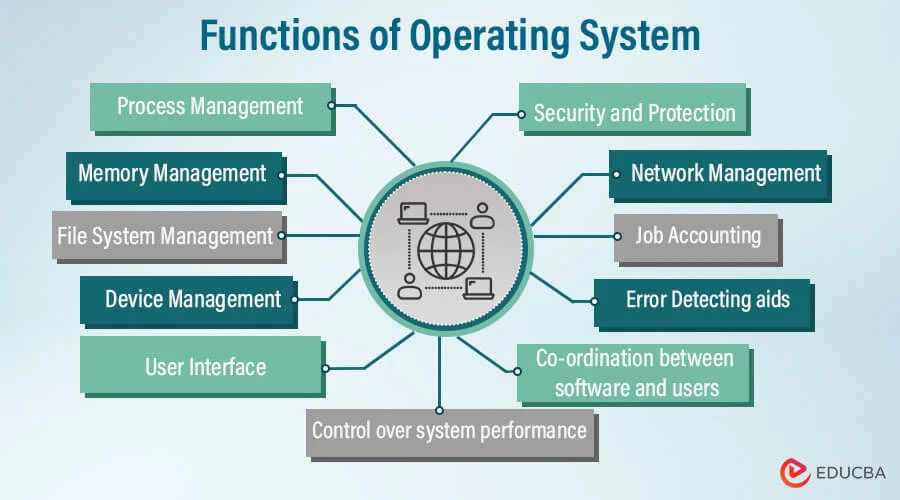
Process management ensures:
- Fair CPU distribution to active programs
- Creating and ending processes without errors
- Communication between related tasks
- Avoiding process conflicts
Example: When you switch between apps, they resume instantly because the operating system keeps track of every running activity.
2. Memory Management: Smart Use of RAM
Memory is limited, but users open multiple applications simultaneously. To avoid slowdowns, the operating system allocates and tracks memory efficiently.
This function handles:
- Assigning memory to processes
- Preventing interference between data
- Using virtual memory during heavy load
- Fast switching between applications through memory mapping
Example: While editing a video, your device keeps important data ready in RAM for smooth performance.
3. File System Organization: Structure and Security
All documents, photos, applications, and system data are stored in a structured way.
File management handles:
- Organizing files into folders/directories
- Managing storage devices like SSD, HDD, and USB drives
- Access permissions to protect sensitive data
- Efficient searching and secure retrieval
Example: When you save or rename a file, the operating system updates its metadata in the file system.
4. Device Handling: Connecting Hardware and Software
No application can directly control hardware like speakers, keyboards, and printers.
Device handling ensures:
- Managing drivers to interact with hardware
- Smooth communication between peripherals and apps
- Error detection in connected devices
Example: When you plug in headphones, the audio automatically switches—this is possible due to proper device handling.
5. System Safety and User Protection
Security is a crucial function. It protects data from misuse and unauthorized entry.
Key protection methods include:
- Password-based login and identity checks
- Permissions for access to files and folders
- Monitoring system behavior against viruses and threats
Example: A firewall check prevents harmful apps from connecting to the internet without permission.
Additional Services That Boost Performance
Along with essential functions, the operating system offers services that improve user experience:
🔹 Networking Support
Wireless and wired communication, file sharing, and cloud operations are handled using built-in network protocols.
🔹 Error Detection
The system actively monitors hardware/software and reports faults to avoid crashes.
🔹 Resource Allocation
If too many tasks demand the CPU, the operating system balances them to maintain stability.
🔹 User Interface
With GUI elements such as icons, menus, and touch gestures, interaction becomes very easy and intuitive.
These services ensure that even beginners can operate complex machines hassle-free.
Final Thoughts
An operating system plays a vital role in managing processes, memory, storage, devices, and safety. Whether it’s Windows, Linux, Android, or macOS — every platform performs these essential duties to keep devices stable and efficient. Understanding these concepts helps students, developers, and tech enthusiasts gain a deeper appreciation for computing.
To explore more, visit this useful reference:
👉 https://www.geeksforgeeks.org/operating-systems/
Read also: AI Chatbots for Students
FAQ
1️⃣ What is the role of an operating system in a computer?
It works as a bridge between hardware and software, making sure everything runs smoothly.
2️⃣ How does process management help multitasking?
It allows multiple programs to run at the same time without system slowdowns or crashes.
3️⃣ What is OS security responsible for?
It protects files, user data, and system resources from unauthorized access and malware.
4️⃣ Name some popular OS used today.
Examples include Windows, Android, macOS, iOS, and Linux distributions.