
Introduction
Frontend development has evolved beyond just creating static web pages. In 2025, businesses need fast, dynamic, and user-friendly web applications, and that’s where skilled frontend developers come in.
If you want to stand out in interviews and land your dream job, you must master the latest frontend tools, frameworks, and best practices.
This blog covers 11 powerful frontend skills that will help you build stunning websites, impress recruiters, and grow your career.
1. HTML5 – The Structure of Every Website
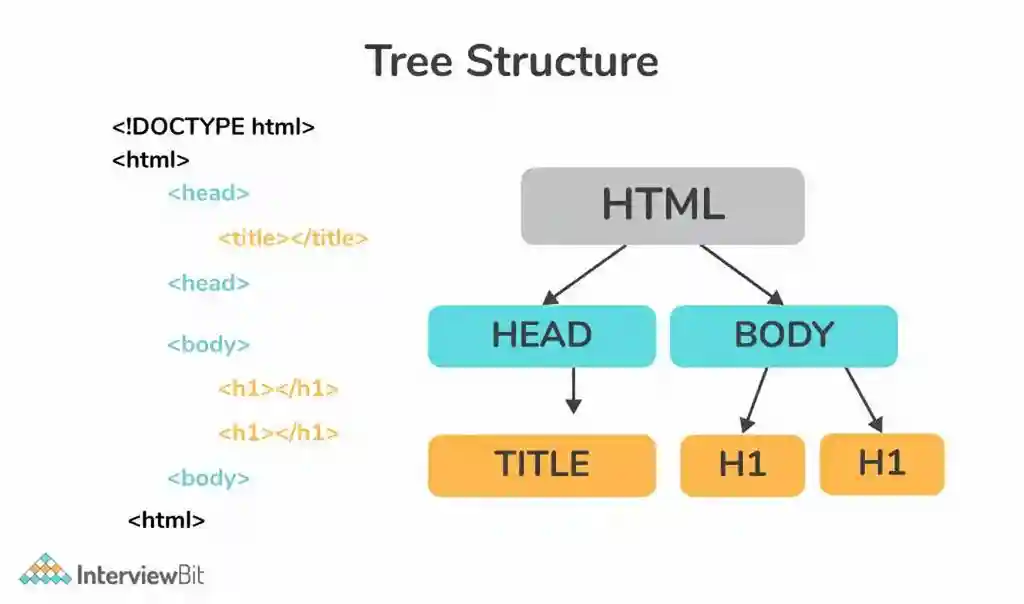
HTML5 is the foundation of every website and defines the overall structure of web pages. It provides the framework to organize text, images, videos, and multimedia elements in a meaningful way. With features like forms, semantic tags, and the <canvas> element, HTML5 makes web pages SEO-friendly and interactive, forming the base of all frontend development.
Advantages:
- Forms the foundation of web pages.
- SEO-friendly and easy to learn.
- Supports multimedia like videos and canvas.
Uses:
Used to define website structure and display content.
Example:
2. CSS3 – Styling and Responsive Design
CSS3 adds beauty and style to websites by controlling their layout, colors, fonts, and responsiveness. It enables developers to create visually appealing designs that adapt to different screen sizes using features like Flexbox, Grid, and Media Queries. CSS3 also supports animations and transitions, making user interfaces more engaging and dynamic.
Advantages:
- Enhances visual appeal and layout.
- Enables animations and transitions.
- Adapts sites to mobile and desktop screens.
Uses:
To make websites visually attractive and responsive.
Example:
3. JavaScript (ES6+) – Adding Interactivity
JavaScript is the language that brings interactivity and logic to web pages. It allows developers to handle user actions, create animations, and connect to APIs for dynamic content updates. Modern ES6+ versions introduce features like arrow functions, promises, and modules, making code cleaner and more efficient for building interactive and powerful web applications.
Advantages:
- Makes websites dynamic and interactive.
- Handles API calls and user actions.
- Backbone of modern web frameworks.
Uses:
Used for event handling, animations, and API integration.
Example:
4. React.js – The Most Popular Frontend Framework
React.js is a JavaScript library used for building fast, interactive, and component-based user interfaces. It allows developers to create reusable components and efficiently update only the necessary parts of a webpage. Its virtual DOM, strong ecosystem, and large community support make it ideal for modern single-page applications (SPAs).
Advantages:
- Component-based development.
- Reusable code and fast rendering.
- Large developer community.
Uses:
Used to build modern single-page applications (SPAs).
Example:
5. TypeScript – Better, Safer JavaScript
TypeScript is a superset of JavaScript that introduces static typing and type safety to prevent errors before runtime. It improves code readability and maintainability, especially in large-scale projects. By offering strong developer tooling and debugging capabilities, TypeScript ensures more reliable and predictable application development.
Advantages:
- Prevents runtime errors.
- Adds strong typing to JavaScript.
- Easier to maintain large codebases.
Uses:
Used in enterprise-level projects for better code reliability.
Example:
6. Tailwind CSS – Modern Styling Made Easy
Tailwind CSS is a utility-first framework that simplifies the process of designing web interfaces. Instead of writing custom CSS, developers use predefined classes to quickly create responsive, beautiful layouts. Its customization options and speed of development make it a popular choice for modern frontend projects.
Advantages:
- Fast UI development.
- Utility-first approach.
- Fully responsive and customizable.
Uses:
Used to style components quickly without writing custom CSS.
Example:
7. Git & GitHub – Version Control for Developers
Git is a version control system that tracks changes in code, while GitHub is a cloud platform for hosting and collaboration. Together, they allow multiple developers to work on the same project, manage versions, and roll back changes when needed. This combination is essential for teamwork, project management, and open-source contributions.
Advantages:
- Tracks changes and versions of code.
- Enables collaboration on projects.
- Easy rollback and team management.
Uses:
Used for source code management and teamwork.
Example:
8. RESTful APIs & JSON – Connecting Frontend and Backend
RESTful APIs enable communication between the frontend and backend of a web application. JSON acts as the lightweight data format that transfers information between servers and clients. This connection allows web pages to dynamically fetch, display, and update real-time data from databases or external services.
Advantages:
- Enables dynamic data fetching.
- Helps build real-time applications.
- Integrates third-party services easily.
Uses:
Used for data communication between client and server.
Example:
9. Web Performance Optimization
Web performance optimization focuses on making websites load faster and perform more efficiently. It involves techniques like compressing images, minifying code, enabling caching, and using lazy loading. Optimized websites improve user experience, reduce bounce rates, and enhance search engine visibility.
Advantages:
- Improves loading speed.
- Enhances user experience.
- Boosts SEO rankings.
Uses:
Used to reduce image size, minify code, and optimize caching.
Example Tips:
- Use image compression tools.
- Implement lazy loading.
- Minify CSS and JavaScript.
10. Accessibility (a11y)
Accessibility ensures that websites can be used by everyone, including people with disabilities. It includes practices like using descriptive alt text, ARIA labels, and keyboard-friendly navigation. A well-accessible site not only promotes inclusivity but also complies with global web accessibility standards such as WCAG.
Advantages:
- Ensures everyone can use your website.
- Builds inclusive web experiences.
- Meets legal accessibility standards.
Uses:
Used to make websites accessible to people with disabilities.
Example:
11. Basic UI/UX Design Principles
UI/UX design focuses on creating visually appealing and user-friendly interfaces. It emphasizes clarity, consistency, and intuitive navigation to make websites more engaging. Following design principles such as color contrast, spacing, and minimalism helps build trust, improve usability, and keep users connected with the website.
Advantages:
- Improves visual flow and usability.
- Keeps users engaged longer.
- Builds brand trust.
Uses:
Used to design layouts that are easy to navigate and pleasing to the eye.
Example Tips:
- Maintain consistent spacing.
- Use contrasting colors for readability.
- Keep the design clean and minimal.
Conclusion
In 2025, companies value frontend developers who can combine creativity with technical skills.
By mastering these 11 essential frontend skills, you’ll become a strong, job-ready developer capable of building modern, interactive, and responsive web apps.
Frequently Asked Questions (FAQ)
1. Is frontend development a good career in 2025?
Yes, it’s one of the best career options with strong job demand and high salaries.
2. Which frontend framework should I learn first?
Start with React.js — it’s the most widely used and beginner-friendly framework.
3. Do I need design skills to become a frontend developer?
Basic UI/UX knowledge helps you build better user experiences, but deep design expertise isn’t required.
4. How long does it take to learn frontend development?
With regular practice, you can learn the basics in 6 months and become job-ready within a year.
5. What are the basic tools every frontend developer should know?
You should learn VS Code, Git & GitHub, Chrome DevTools, and Figma for design collaboration.
Helpful Links to Level Up Your Dev Skills
👉Top 10 Backend Frameworks Developers Should Master in 2025